



Smart User Manager
Automated User Management for Joomla
Automatically manage inactive Joomla users, remove unactivated accounts and send email reminders. Create flexible rules to clean up user accounts, automate recurring tasks and keep full control with built-in simulation and logging.
€39 per year including updates and support
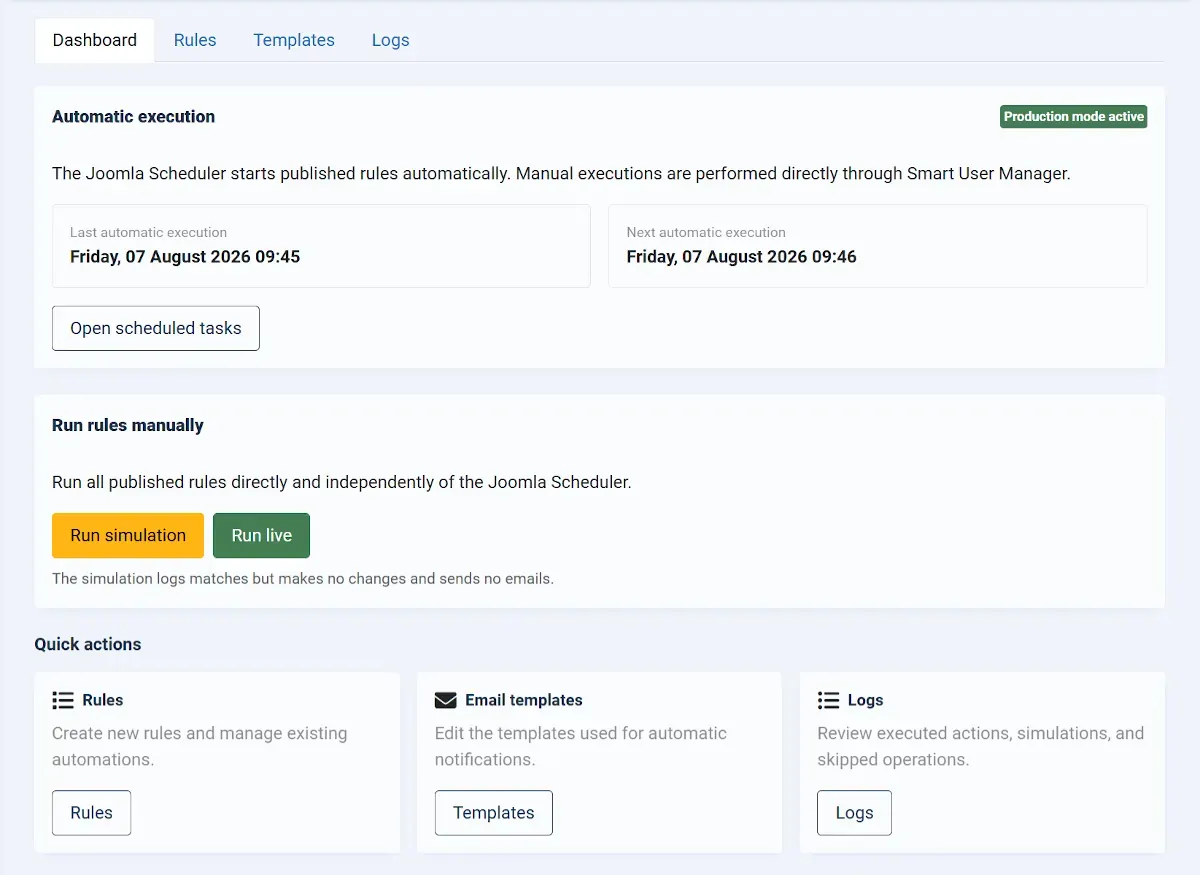
Less administration. More control.
Smart User Manager handles recurring Joomla user management tasks for you.
As the number of users grows, managing accounts manually can quickly become confusing. Unactivated accounts, long-term inactive users and recurring checks take time and increase the risk of mistakes.
Instead of reviewing users manually again and again, you create rules with freely configurable conditions. As soon as all conditions are met, the extension automatically performs the selected action.
You remain in control at all times. New rules can be simulated before they are activated, individual users or groups can be protected, and every execution is recorded in a detailed log.
Automate common user management tasks
Whether you manage an association website, membership portal, customer area or community, the rules can be adapted to suit a wide range of requirements.
Remove unactivated accounts
Automatically delete user accounts when registration has not been completed within a defined period.
Remind inactive users
Automatically send a reminder email before taking further action, such as blocking or deleting an account.
Block user accounts
Block users after an extended period of inactivity or according to other freely combinable criteria.
Delete accounts later
Notify users first, block the account later and delete it only after an additional period has passed.
Protect administrators
Exclude important user groups or individual accounts entirely from automated processing.
Run rules automatically
Use Joomla Scheduled Tasks to execute active rules automatically at regular intervals.
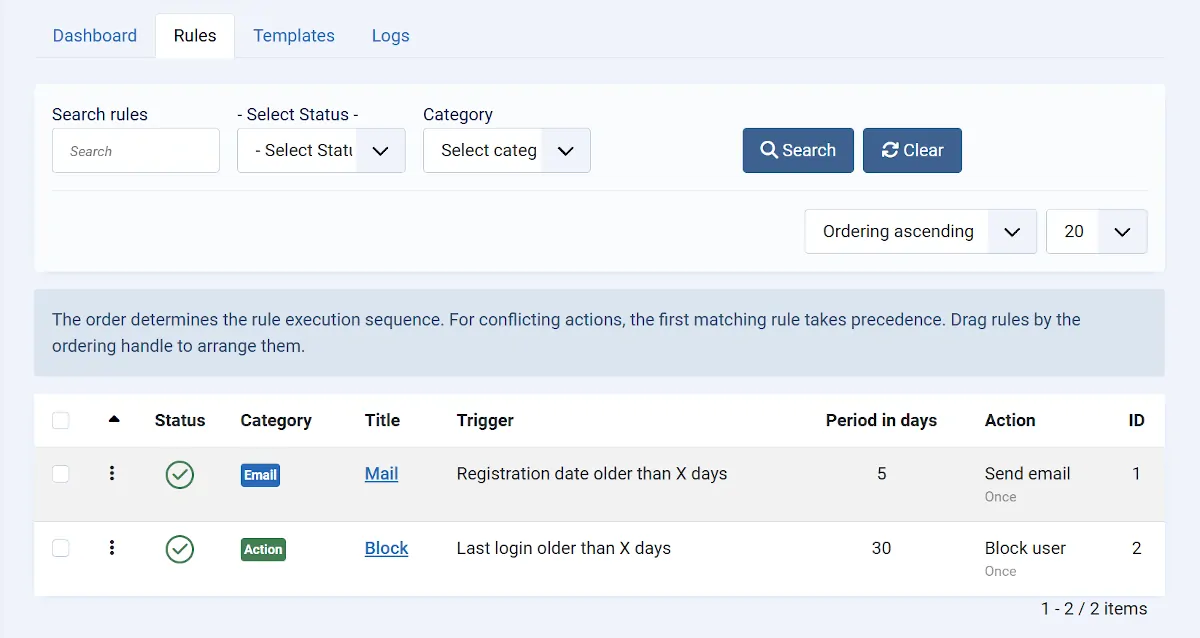
Flexible rules instead of rigid workflows
Each rule consists of freely configurable conditions and exactly one action. The selected action is only executed when all defined conditions have been met.
This allows you to create both simple clean-up rules and multi-step workflows without any programming knowledge.
- Create as many rules as required
- Define priorities and execution order
- Activate or pause individual rules
- Preview affected users before execution
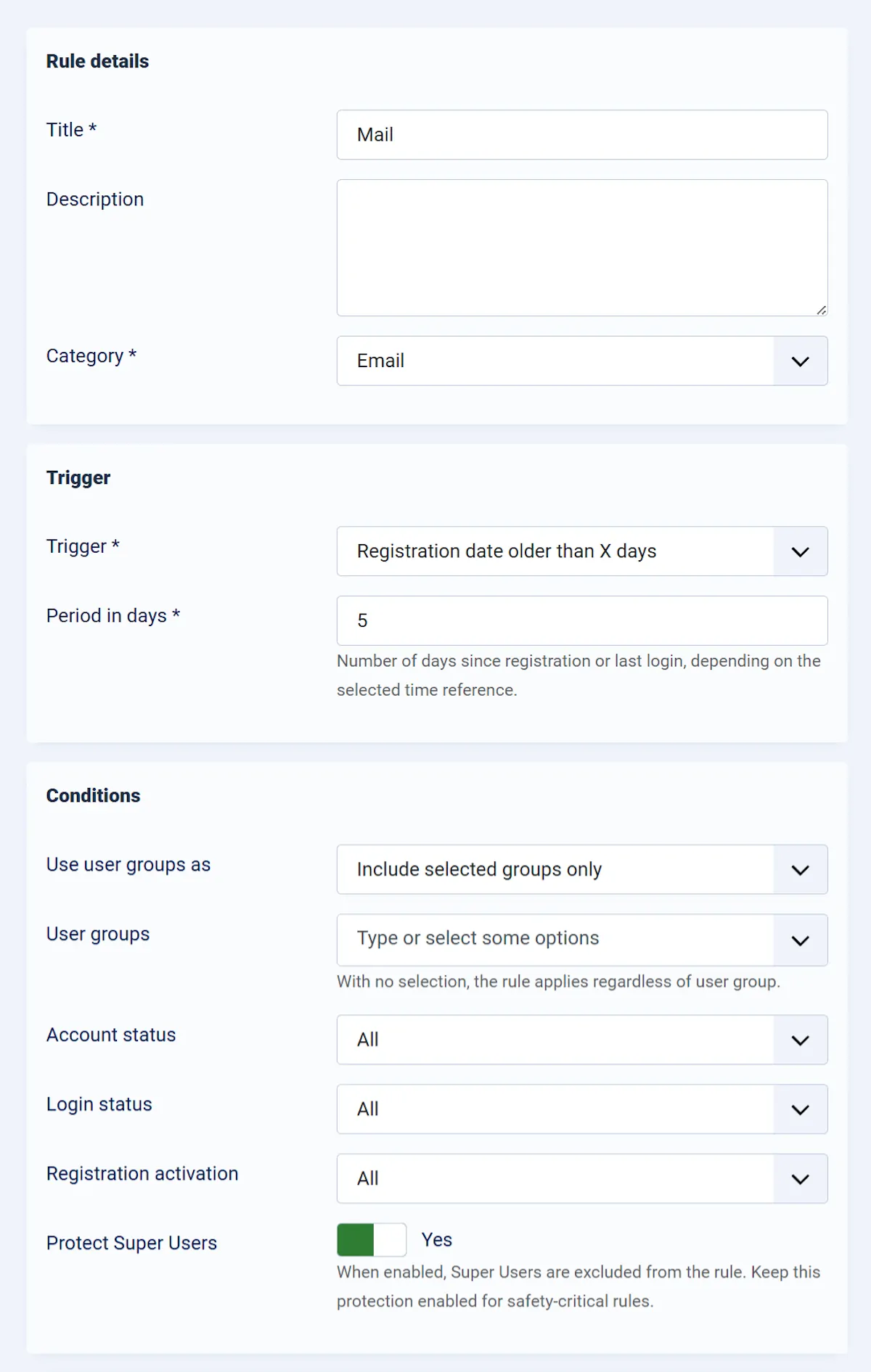
Select users precisely
Multiple conditions can be combined within a rule. A user is only included when all defined criteria have been met.
Combine multiple steps safely
Many user management tasks involve more than one action.
For multi-step workflows, simply create several rules with different time periods and actions. Each step remains separately configurable and fully traceable.
For example, you can notify a user first, block the account later and delete it only after a further period has passed.
Send an automatic reminder email.
Temporarily prevent the user from logging in.
Remove the account after the final defined period.
Test first. Execute with confidence.
Automatic changes to user accounts should never be performed without verification. That's why every rule can be fully simulated before it is actually executed.
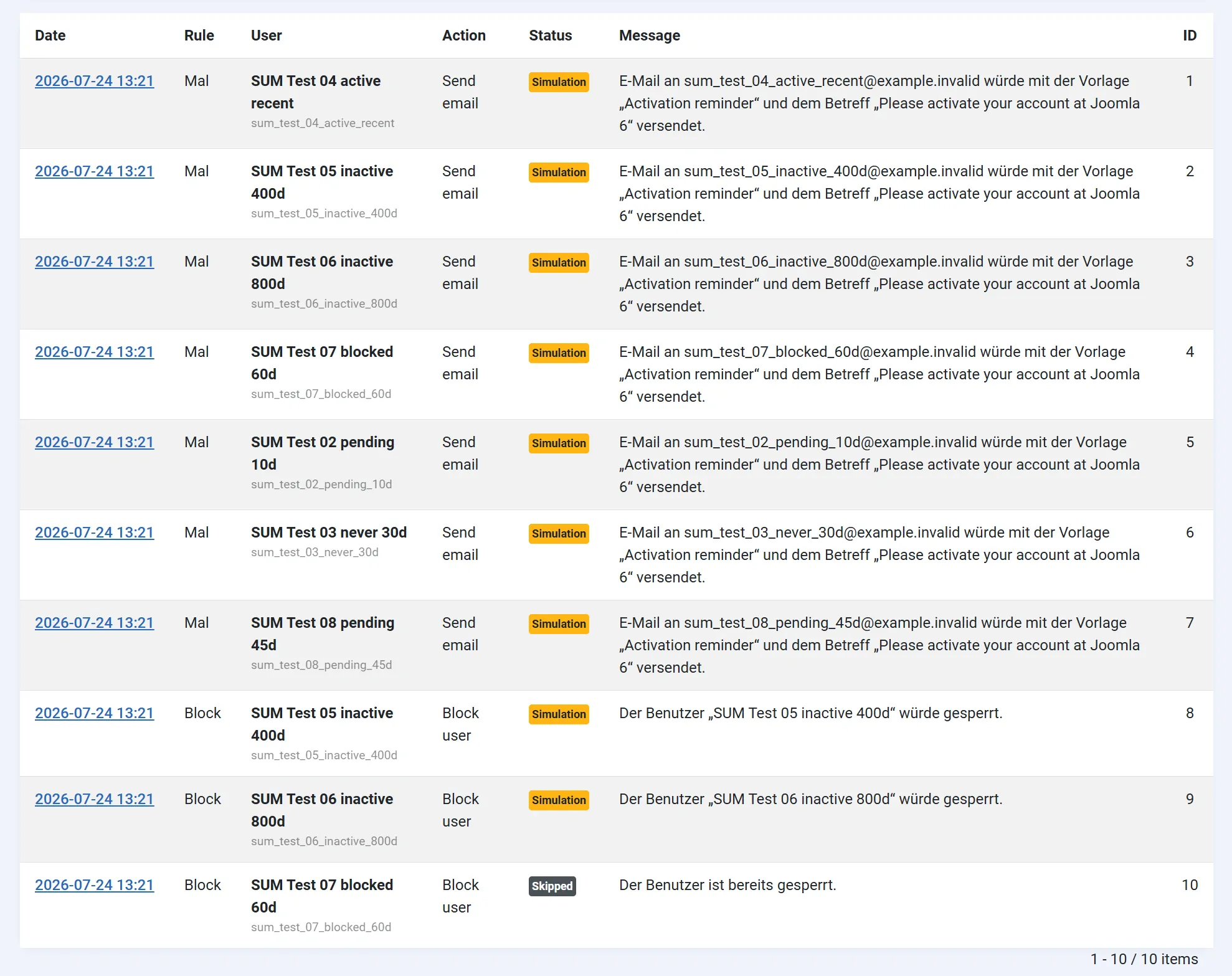
The extension shows which users would be affected and which action would be performed without making any real changes.
- No user accounts are modified
- No accounts are blocked or deleted
- No emails are sent
- All planned actions are logged
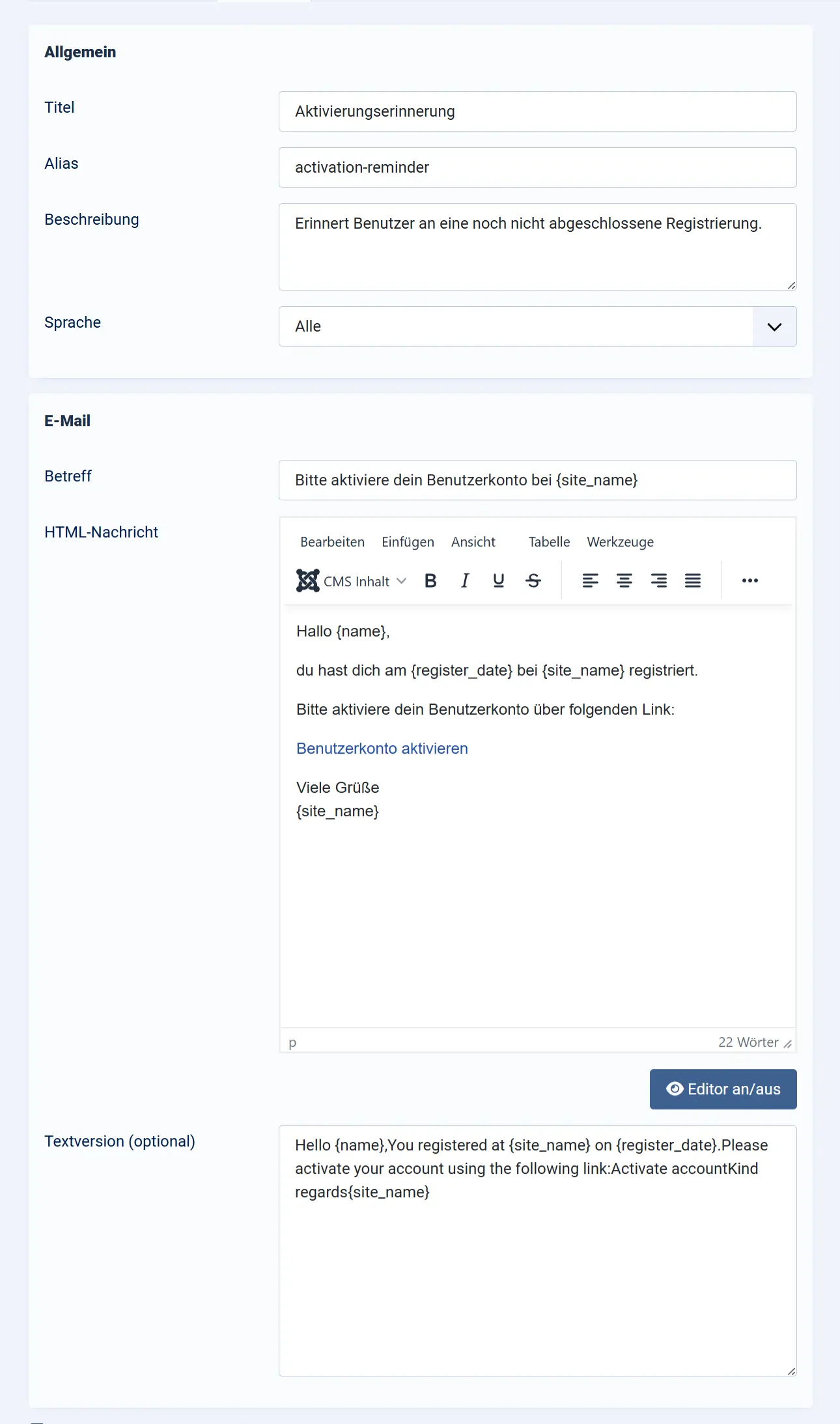
Notify users automatically
Create your own email templates for reminders, account blocking, scheduled deletions or any other notifications.
Templates can be created in multiple languages and personalised using placeholders for user information.
- Multilingual templates
- Custom subject lines
- User data placeholders
- Delivered through the Joomla Mailer
Track every execution
Both real executions and simulations are recorded in a clear, easy-to-read log.
Automate execution with Joomla
Smart User Manager integrates with Joomla's built-in Scheduled Tasks. Once a task has been configured, all active rules are processed automatically at the selected interval.
No external scripts are required. Everything runs directly within Joomla.
Run Smart User Manager
Designed for safe automation
Automated user management requires reliable safeguards. Smart User Manager includes multiple protection mechanisms to prevent unintended changes.
Administrator Protection
Important administrator accounts are protected by additional internal safety checks.
Protected User Groups
Exclude entire user groups from automatic processing.
Individual Exclusions
Protect individual users regardless of their other properties.
Simulation Mode
Verify new rules without modifying user accounts or sending emails.
Execution Lock
A built-in locking mechanism prevents multiple rule executions from running simultaneously.
Batch Processing
Large numbers of users can be processed safely in manageable batches.
Everything you need in one extension
Flexible Rules
Create unlimited rules with different conditions, actions and priorities.
Email Templates
Notify users with multilingual, fully customisable email templates.
Simulation Mode
Test rules safely before making changes to user accounts.
Logging
Keep track of executed and simulated actions at any time.
Scheduled Tasks
Run active rules automatically using Joomla's built-in task scheduler.
Safety Features
Protect important users, groups and administrator accounts from unintended changes.
System Requirements
Before installation, please make sure your website meets the following technical requirements.
Comprehensive Documentation
From installation and creating your first rule to automated execution with Joomla Scheduled Tasks, the documentation guides you through every step.
How to Manage Inactive Joomla Users
Learn how to identify inactive Joomla users, send automated reminders and safely remove unused accounts to keep your website clean and organised.
One price. All features.
Your licence includes the complete extension, updates and support throughout the licence period.
Included with your licence
- Full extension
- All available features
- Updates during the licence period
- Support during the licence period
- English and German documentation
- Use on unlimited websites under the GNU/GPL licence
Questions & Answers
Can I test rules before executing them?
Yes. In Simulation Mode, no changes are made. All actions are simulated and recorded in the log.
Is the extension compatible with Joomla 6?
Yes. Smart User Manager has been developed for Joomla 5 and Joomla 6.
Can specific administrators be excluded?
Yes. You can exclude entire user groups as well as individual users from automatic processing. In addition, the extension includes built-in protection for important administrator accounts.
Can I notify users before deleting their accounts?
Yes. Simply create multiple rules with different time periods and actions to build a multi-step workflow.
How can I automatically delete inactive Joomla users?
Smart User Manager allows you to create rules that identify users who have not logged in for a specified period. You can automatically notify, block or delete these accounts based on your configured conditions.
Before enabling a deletion rule, you can preview the affected users and test the rule using Simulation Mode without making any changes.
Can I automatically delete unactivated Joomla user accounts?
Yes. Smart User Manager can identify accounts that have not been activated within a specified period after registration and automatically delete them.
You can also create a separate rule to send an activation reminder before deleting the account.
Are emails sent while Simulation Mode is enabled?
No. Email actions are only simulated and recorded in the log.
Does the extension support multilingual websites?
Yes. Email templates can be created in multiple languages.
What happens when I uninstall the extension?
A complete uninstall removes all extension files as well as the associated database tables, including rules, email templates and log entries.
Can I install the extension on multiple websites?
Yes. Under the GNU/GPL licence you may install Smart User Manager on as many websites as you like. Updates and support are available with an active licence.
What happens when my licence expires?
The installed extension will continue to work. However, updates and support require an active licence.
Version History
Fixed: Fixed an issue where the email template selection could appear as an empty field on some server environments.
Initial public release.
Automate Joomla user management with confidence
Reduce repetitive administrative tasks while staying in full control with flexible rules, Simulation Mode and detailed logging.