



Quick Admin Redirect
Automatically redirect administrators after login
Redirect selected administrators after they log in to the Joomla backend and send them directly to a specific component or custom URL.
Try it for free or get the Pro Version for €19 per year
Send administrators directly to the right backend area
Not every administrator needs to see the full Joomla dashboard after logging in. Quick Admin Redirect automatically sends selected users to the area they actually need.
You can define which Joomla component or custom URL should be opened after a successful backend login for each selected user.
This allows editors, shop employees and other administrators to reach their tasks immediately without navigating through the backend menu first.
The redirect only applies to users selected in the plugin settings. All other administrators continue to use the Joomla backend as usual.
The right backend area for every administrator
Redirect users directly to the component or page they need for their daily work.
Content editors
Open the article manager or a specific content category immediately after login.
Shop employees
Send employees directly to the order or product management area of your shop component.
Event management
Open the relevant event or booking component for responsible users.
User management
Redirect selected administrators directly to the Joomla user management area.
Custom components
Use installed Joomla components as individual destinations after login.
Custom URLs
Enter any custom URL as the redirect destination.
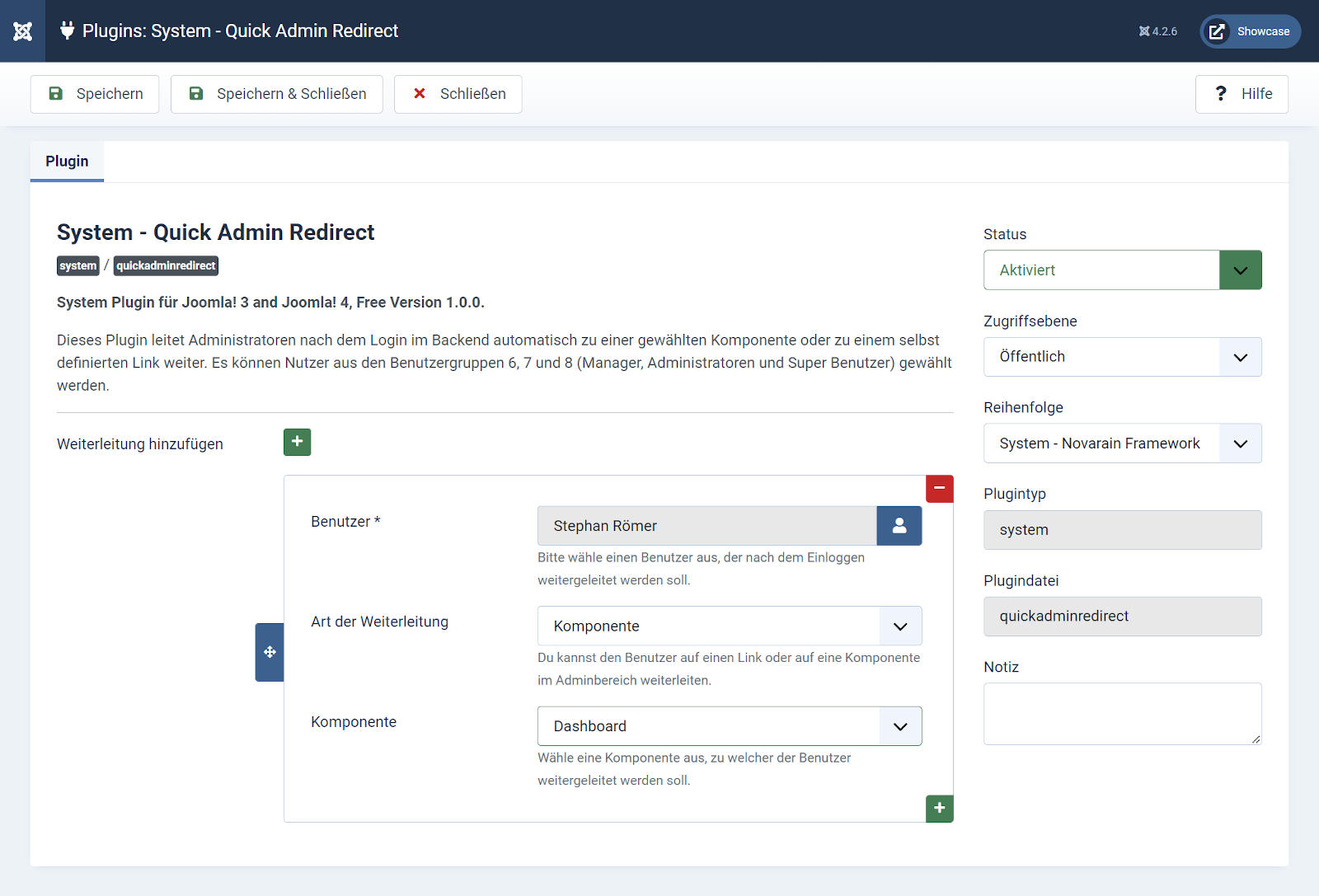
Select a user and define the redirect destination
Redirect rules are configured directly in the settings of the Joomla system plugin.
Select an administrator and decide whether the user should be redirected to a Joomla component or to a custom URL after login.
- Select specific administrators
- Use a Joomla component as the destination
- Enter a custom URL
- Manage multiple redirects
- No Joomla core modifications
Joomla component or custom URL
Choose different redirect destinations depending on the responsibilities of each user.
After login, the administrator immediately sees the area required for their work.
Set up an automatic redirect in just a few steps
The entire configuration is completed directly in the Joomla backend.
No template modifications, overrides or changes to Joomla core files are required.
Install Quick Admin Redirect through the Joomla extension manager.
Enable the system plugin in the Joomla plugin manager.
Choose the administrator for whom the redirect should apply.
Select a Joomla component or enter a custom URL.
Fewer clicks and a more focused backend experience
Quick Admin Redirect simplifies backend access for users with clearly defined tasks.
Direct access
Users reach their working area immediately without unnecessary navigation.
Individual destinations
Each selected administrator can receive a different redirect destination.
Less navigation
Frequently used components no longer need to be found through the backend menu.
Flexible configuration
Use a Joomla component or any custom URL as the destination.
No core hacks
Joomla core and template files remain unchanged.
Quick setup
All settings are managed directly in the plugin.
Choose the version that fits your workflow
Test the plugin for free or use all features with the Pro Version, including updates and premium support.
System requirements
Before installation, check whether your website meets the required conditions.
Download Quick Admin Redirect for free
Test the basic redirect functionality on your Joomla website free of charge.
Included in the Free Version
- Free plugin version
- Automatic redirect after login
- Updates for the Free Version
- Limited support
- Usage under the GNU/GPL
All features with updates and premium support
Use the complete feature set of Quick Admin Redirect and receive updates and premium support while your license is active.
Full feature set, updates and premium support for one year.
Buy Pro VersionIncluded in the Pro Version
- All Pro Version features
- Individual redirects for administrators
- Components and URLs as destinations
- One year of downloads and updates
- One year of premium support
- Usage under the GNU/GPL
Questions and answers
What does Quick Admin Redirect do?
The plugin automatically redirects selected administrators after a successful login to the Joomla backend and sends them to a defined component or URL.
Can I redirect different administrators to different destinations?
Yes. You can configure individual redirect destinations for selected administrators.
Can I redirect users to a Joomla component?
Yes. An installed Joomla component can be selected as the redirect destination.
Can I use a custom URL as the destination?
Yes. In addition to Joomla components, you can enter any custom URL as the redirect destination.
Are all administrators redirected?
No. The redirect only applies to users selected in the plugin settings.
What is the difference between the Free and Pro Versions?
The Free Version is suitable for testing and provides a limited feature set. The Pro Version includes all features as well as one year of updates and premium support.
Can I use the extension on multiple websites?
Yes. Under the GNU/GPL, the extension may be installed on any number of websites. Updates and support are available according to the respective version or an active Pro license.
Version history
First release of the Pro Version on December 18, 2024.
Updated language files for current Joomla versions.
Redirect administrators immediately after login
Simplify access to the Joomla backend and open the right working area for every selected administrator.